Onboarding 1 / 8
Welcome

Let's build your Cheers POS account

We'll ask a few quick questions, recommend the best plan for your store, gather your business details, and then let you reserve your install.

Avg. install time
10–14 days
Customer satisfaction
100%
Support
U.S.-based
About You

Tell us about your role and goals

How You Operate

Store type, lanes, and hardware

Features

Choose what matters most

Pick the tools you care about today — we'll match the best plan. You can always add or remove features later.

Want more detail? Tap any feature below to see how it helps your store.
Dual Pricing / Cash Discounting Boost margins, reduce card fees
Dual Pricing lets you legally offer a cash price and a card price. Your shelf prices stay the same — customers simply get a discount when paying cash. Stores typically see 20–40% savings on processing fees, putting real money back into your pocket every month.
EDI / Fintech Integration No more manual invoices
Fintech automatically pulls distributor invoices into Cheers POS, matches items, updates costs, and syncs case breaks. You save hours each week and avoid costly data entry errors on high-volume deliveries.
QuickBooks Online Clean books, less stress
Cheers automatically sends your daily sales, payouts, and taxes into QuickBooks Online. No more end-of-month crunch or hand-keyed summaries. Your accountant gets exactly what they need, every day.
Shopify Integration In-store + online together
Accept orders on your website while keeping inventory and pricing synced with your store. Cheers updates stock levels as orders are fulfilled so you don't oversell or miscount key items.
Loyalty Suite Turn shoppers into regulars
Create point programs, VIP discounts, birthday offers, and more. Combine loyalty with text or email campaigns to bring customers back when traffic is slow and increase average basket size.
Gift Cards Pre-paid future business
Sell physical or digital gift cards that work seamlessly at the register. Cards are reloadable, trackable, and help you lock in customer spend long before they walk in the door.
Payroll Suite Real hours, not guesses
Track time based on actual clock-ins and register activity. Export clean reports to your payroll provider and keep everyone honest with accurate hours and audit logs.
Scan Data Earn from tobacco rebates
Automatically collect and export the data required for Altria and RJR programs so you can earn manufacturer incentives on qualifying tobacco sales — often thousands per year.
Your Best Match

You're a perfect fit for Uncorked

Based on your selections, here's the setup we recommend for your store.

Recommendation

Uncorked (Hardware + Software)

All-in-one hardware and software bundle for busy liquor stores.
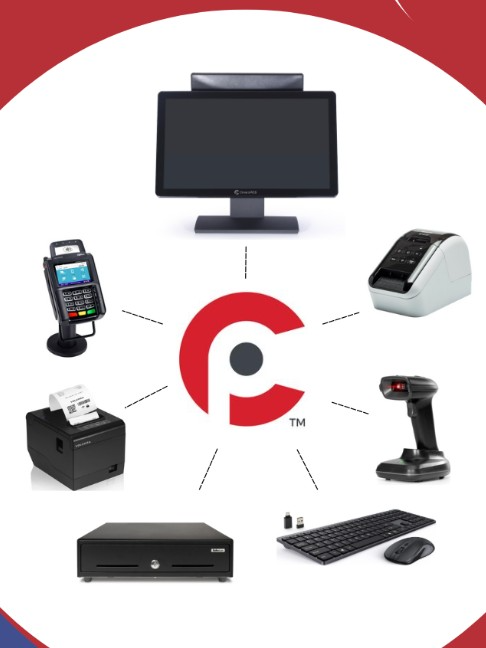
Selected lane count:
We'll collect your business details next, then you'll have the option to reserve your install with a deposit.
Finalize

Business Information

Now we'll gather the details we need to set up your account, agreements, and payment processing correctly.

Review

Review your selections 🎉

Here's everything we've captured. You can copy this for your records, and on the next step you'll have the option to reserve your install with a deposit.

Reserve Your Install

Lock in your install date with a small deposit

We've collected your information and recommended plan. This final step lets you reserve an install window so our team can order hardware, prepare training, and schedule your go-live. When you go live within 20 days of signing, your first month of subscription is free.

Your Configuration
Plan:
Lanes:
Hardware:
Processing:
Contract Term:
Monthly Subscription: $0
Due Today: $0

What happens if I need a refund?
Your deposit is applied directly to your first invoice. If we cannot meet your agreed-upon install window, or if you cancel within our written cancellation window, your deposit is refundable per the Cheers POS deposit & refund policy. Your final agreement will spell this out in writing.
Can I reschedule my install date?
Yes. If you need to move your install to a different date, we'll work with you to find a new window. As long as you reschedule inside the allowed reschedule period, your deposit simply moves with your new date rather than being forfeited.
How does the $500 referral bonus work?
When you refer another liquor store that signs up, installs Cheers POS, and goes live, we credit you a $500 referral bonus. This can be applied toward your subscription, hardware add-ons, or other services. Your sales rep can walk you through the details and provide the written referral terms.
How do I get my free month?
If your store goes live within 20 days of signing, your first month of subscription is free. We use the install/go-live date on your final paperwork to confirm eligibility and automatically apply the credit to your first billing cycle.

Deposits reserve your install window and help us schedule training and hardware prep. Your deposit is applied directly to your first invoice. For exact terms around refunds, rescheduling, and promotions, please review your Cheers POS agreement.